OPC-UA
This tab provides steps that integrate with OPC-UA compatible devices and systems.
On opcua
This trigger step pauses the scenario until a signal is received from a specific OPC-UA node.
| Parameter | Type | Description |
|---|---|---|
| OPCUA device | Mandatory | The OPC-UA device that this step listens to. |
| Node id | Mandatory | The node id of the OPC-UA item that this step listens to. |
On opcua value match
This trigger step pauses the scenario until the value of a specific OPC-UA node matches an expected value.
| Parameter | Type | Description |
|---|---|---|
| OPCUA device | Mandatory | The OPC-UA device that this step listens to. |
| Node id | Mandatory | The node id of the OPC-UA item that is monitored. |
| Expected value | Mandatory | The value the node must reach to trigger this step. |
| Ignore case | Mandatory | If enabled, the value comparison ignores letter case. |
Write PLC values
This action step writes a fixed, configured value to an OPC-UA node. Use it when the value to write is always the same, unlike Write database value to OPC UA node, which writes a value read from the database.
| Parameter | Type | Description |
|---|---|---|
| PLC device | Mandatory | The PLC device to write to. |
| Node id | Mandatory | The node id of the OPC-UA item to write to. |
| OPC UA node value | Mandatory | The value to write to the node. |
Examples
Example 1: Writing a Fixed Value when Production Starts via OPC-UA
When a signal is received from the configured OPC-UA node, the On opcua step triggers the scenario. The Start Production step starts production on the line, and the Send print job to printer step sends the label to the printer. The Write OPC UA values step then writes the configured value to the target node.

Read PLC values
This action step reads the current value of a PLC item on demand and makes it available to subsequent steps in the same scenario run. Unlike the On opcua and On opcua value match trigger steps, which wait for a value to change, this step actively reads the value at the moment it is executed. Use it when the production line exposes a product or order identifier as a PLC value, and a subsequent step, for example Select product or Select production order, needs this value to find the matching record in the master data.
The step works with both OPC-UA and Modbus devices, in the same way as the Write PLC values step.
| Parameter | Type | Description |
|---|---|---|
| PLC device | Mandatory | The PLC device to read from. This can be an OPC-UA or a Modbus device. |
| Node id | Mandatory | The item to read: the node id of an OPC-UA device or the register of a Modbus device. |
Examples
Example 1: Selecting a Product based on a PLC Value
When the value of the configured PLC item matches the expected value, the On PLC value match step triggers the scenario. The Read PLC values step reads the current product identifier from the PLC. The Select product step uses this value to identify the matching product from the master data, and the Send print job to printer step sends the label to the printer. The Write database value to OPC UA node step then writes the selected column of the product back to the configured node.

Example 2: Selecting a Production Order based on a PLC Value
When a signal is received from the configured PLC item, the On PLC step triggers the scenario. The Write PLC values step writes a fixed value to the PLC, for example to reset an error flag. The Read PLC values step reads the current order identifier from the PLC. The Select production order step uses this value to identify the matching production order from the master data. The SQL Executor step then runs an SQL query against an external database, for example to store data of the selected production order.

Limitations
- If the read fails (e.g. the device or item is unreachable), the step fails and the error is reported in the scenario logs.
Write database value to OPC UA node
This action step writes a value from a database table to an OPC-UA node. Use it to share production data, for example production order or logistic unit information, with external PLCs and devices during the print process. When the step is executed, the current value of the selected column for the currently selected record is written to the selected node.
| Parameter | Type | Description |
|---|---|---|
| DB table | Mandatory | The database table containing the value to write: Product, Production Order, Logistic Unit, ect. |
| DB column | Mandatory | The column of the selected table whose current value is written to the node. |
| OPCUA device | Mandatory | The OPC-UA device to write to. |
| Node id | Mandatory | The node id of the OPC-UA item to write to. The list shows the nodes configured for the selected device. |
Examples
Example 1: Sharing Production Data after Printing
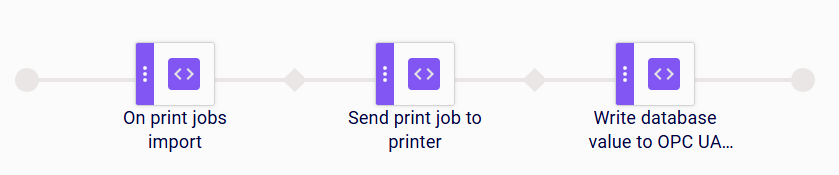
When print jobs are imported, the On print jobs import step triggers the scenario. The Send print job to printer step sends the label to the printer. The Write database value to OPC UA node step then writes the current value of the selected column, for example from the production order, to the configured OPC-UA node.
Example 2: Sharing Logistic Unit Data with a PLC
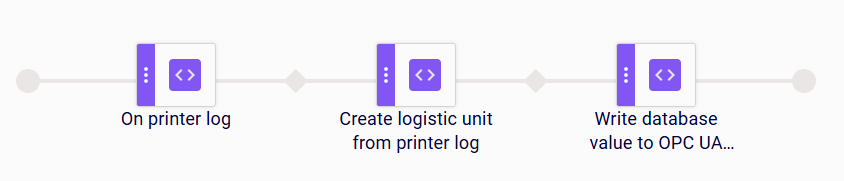
When a new printer log entry arrives, the On printer log step triggers the scenario. The Create logistic unit from printer log step creates a logistic unit from the log entry. The Write database value to OPC UA node step then writes the selected column of the logistic unit, for example its identifier, to the configured OPC-UA node.
Limitations
- If the write fails (e.g. the node is unreachable or the value type does not match the node’s type), the step fails and the error is reported in the scenario logs.