FIFO Queue
This tab provides steps that manage a first-in, first-out data queue. Use these steps when you need to buffer and process data in the order it was received.
FIFO push item
This action step adds the current Item (production order, product, logistic unit) to the end of a FIFO queue. The item is the one available at the point where the step runs, for example a logistic unit created by a preceding step. Because the queue is shared, the record stays available beyond the coding scenario that added it: another scenario can retrieve the queued item later with the FIFO get item step, in the same order they were added. Use this step to hand data over to a scenario that processes it at a later point in the production process.
| Parameter | Type | Description |
|---|---|---|
| FIFO Queue | Mandatory | The queue the record is added to. |
Examples
Example 1: Queuing a Logistic Unit for Later Processing
When ZPL data is received over a socket connection, the On socket read step receives the input. The Create logistic unit from ZPL step creates a logistic unit from the ZPL print data, and the Assign aggregation to logistic unit step assigns the aggregation layer to it. The FIFO push item step then adds the logistic unit to the end of the queue, so that another coding scenario can process it later.

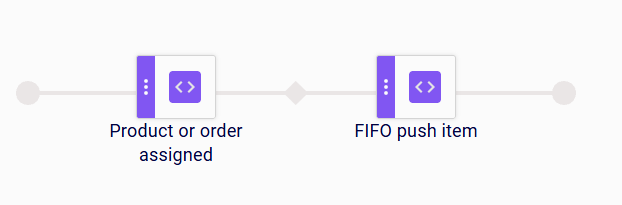
Example 2: Buffering the Current Data Item When a Product or Order Is Assigned
When a product or production order is assigned to the production line, the Product or order assigned step starts the sequence. The FIFO push item step then adds the current item to the end of the queue, so that it can be retrieved and processed in the order it was received.
Limitations
- The step adds the item that is available where it runs; place it after the step that creates or selects the item to be queued.
- Records remain in the queue until another step retrieves or removes them.
FIFO get item
This action step retrieves the next data record from the front of a FIFO queue and makes it available to subsequent steps. The record is not removed from the queue; it stays at the front until a FIFO delete item step removes it. The retrieved data is available to the following steps like any other data record in the scenario, so it can also be used for printing: a Send print job to printer step placed after this step sends the queued record to the printer as a print job. Use this step to process buffered records in the order they were added.
| Parameter | Type | Description |
|---|---|---|
| FIFO Queue | Mandatory | The queue the record is read from. |
Examples
Example 1: Printing the Next Queued Record When a Product Is Reloaded
When the active product on the production line is reloaded, the On product reloaded step triggers the scenario. The FIFO get item step retrieves the next record from the front of the queue and makes its data available, and the Send print job to printer step then sends that data to the printer as a print job. The FIFO delete item step finally removes the processed record from the queue.

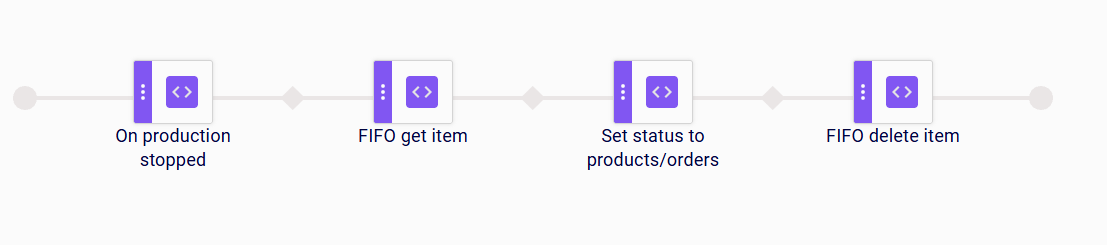
Example 2: Updating the Next Queued Record When a Production Is Stopped
When a production is stopped on the line, the On production stopped step triggers the scenario. The FIFO get item step retrieves the next record from the front of the queue and makes its data available, and the Set status to products/orders step then sets the configured statuses on the products and production orders of that record. The FIFO delete item step finally removes the processed record from the queue.

Limitations
- The step always retrieves the record at the front of the queue; it cannot select a specific record.
- The step does not remove the record it retrieves. Place a FIFO delete item step after the steps that process it, otherwise the same record is retrieved again the next time the scenario runs.
FIFO delete item
This action step removes a record from a FIFO queue.
| Parameter | Type | Description |
|---|---|---|
| FIFO Queue | Mandatory | The queue the record is removed from. |
Examples
Example 1: Removing a Processed Record when Production Stops
When a production is stopped on the line, the On production stopped step triggers the scenario. The FIFO get item step retrieves the next record from the front of the queue, and the Set status to products/orders step sets the configured statuses on the products and production orders of that record. The FIFO delete item step then removes the record from the queue, so it is not processed again.
Example 2: Removing a Record after Its Label Has Been Printed
When a production is started on the line, the On production started step triggers the scenario. The FIFO get item step retrieves the next record from the front of the queue, and the Send print job to printer step sends the corresponding label to the printer. The FIFO delete item step then removes the record from the queue, so it is not printed again.

Limitations
- The step removes one record per execution.
- Retrieving a record with FIFO get item does not remove it from the queue. Without FIFO delete item, the record stays in the queue and is retrieved again on the next run.
- The step only removes the record from the queue. It does not delete the underlying master data.
Link logistic units from FIFO
This action step aggregates logistic units that are buffered in a FIFO queue under a pallet, for example the boxes that belong to that pallet. It is used in pallet coding scenarios: the logistic unit of the pallet is created or selected by a preceding step, and this step then pulls the configured number of logistic units off the queue in FIFO order and assigns the pallet’s logistic unit as their parent. Because the units are pulled off the queue, each buffered unit is aggregated under exactly one pallet.
| Parameter | Type | Description |
|---|---|---|
| FIFO Queue | Mandatory | The queue the logistic units are pulled from. |
| Number of logistic units | Optional | The number of logistic units pulled off the queue per pallet. If empty - pulled whole queue |
| Throw exception if not enough units | Mandatory | If enabled, the scenario raises an error when the queue holds fewer logistic units than configured. If disabled, the step proceeds with the units actually available, for example for the last, partial pallet of a production run. |
Examples
Example 1: Aggregating Logistic Units under a Newly Created Pallet
When a scan event occurs, the On scan step receives the scan input. The Create logistic unit from scan step creates the logistic unit of the pallet from the scanned value, and the Assign aggregation to logistic unit step assigns the aggregation to it. The Link logistic units from FIFO step then pulls the configured number of logistic units off the queue in FIFO order and assigns the newly created logistic unit as their parent.

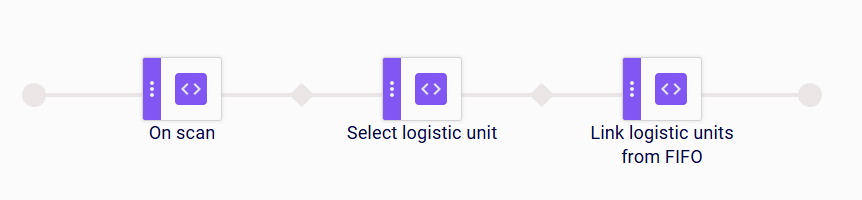
Example 2: Aggregating Logistic Units under an Existing Pallet
When a scan event occurs, the On scan step receives the scan input. The Select logistic unit step uses that input to find and select the logistic unit of the pallet from the master data. The Link logistic units from FIFO step then pulls the configured number of logistic units off the queue in FIFO order and assigns the selected logistic unit as their parent.
Limitations
- The step is available in pallet coding scenarios only.
- The step requires the logistic unit of the pallet to be created or selected by a preceding step; place it after the step that creates or selects it.
- The logistic units to aggregate must be added to the queue beforehand, for example by a FIFO push item step in the coding scenario that creates them.
Flush FIFO
This action step clears a FIFO queue: it removes all records currently queued, regardless of their type. When the queue buffers logistic units for aggregation, the queued units are discarded without being assigned to any pallet. Use this step for error recovery or for end-of-run cleanup, so that the next production run starts with an empty queue.
| Parameter | Type | Description |
|---|---|---|
| FIFO Queue | Mandatory | The queue that is cleared. |
Examples
Example 1: Clearing the Queue after Aggregating a Newly Created Pallet
When a scan event occurs, the On scan step receives the scan input. The Create logistic unit from scan step creates the logistic unit of the pallet from the scanned value, and the Assign aggregation to logistic unit step assigns the aggregation to it. The Link logistic units from FIFO step aggregates the configured number of logistic units under that pallet. The Flush FIFO step then removes the units left in the queue, so they are not aggregated under the next pallet.

Example 2: Clearing the Queue after Aggregating an Existing Pallet
When a scan event occurs, the On scan step receives the scan input. The Select logistic unit step uses that input to find and select the logistic unit of the pallet from the master data. The Link logistic units from FIFO step aggregates the configured number of logistic units under that pallet. The Flush FIFO step then removes the units left in the queue, so they are not aggregated under the next pallet.

Limitations
- The step clears the entire queue at once. To remove a single record, use FIFO delete item.
- Records removed by this step are discarded and are not assigned to any pallet.